
Devlog: week 20
It seems I got up speed again :D
I make HUD bit by bit: inventory is fully finished, skin for notes and to-do list is ready, adding necessary functionality for the list (it will be transferred to the notes later too + notes will need an input field). Overall everything works, but I have a big problem I can't solve for two days already.
To Do/Notes window has three states: minimized, half-expanded and fully expanded. All of that smoothly moves up or down over 0.5 secons.
All of that but text.
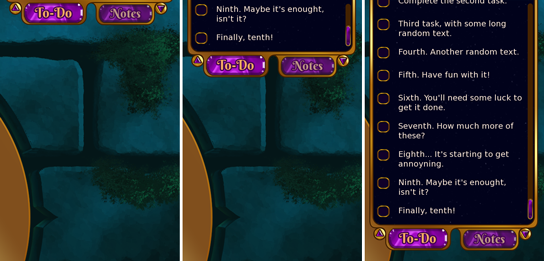
The idea was for the window to keep text position the way that text moves with the window without resetting scroll. Let's say in fully expanded mode you can see tasks from #6 to #10. You half-minimize it and see only task #10 if it's four lines long, or tasks #9 and #10 if they're one-two lines long each. And vice versa, what you see in the small window will be at the bottom of the big one.
Alas :D
For now either scroll abruptly jumps to the very bottom and then text smoothly moves, or the text smoothly moves and then scroll position resets and recalculating it back is also abrupy, or everything just jumps, without smooth movement at all.
Looks bad.
making the invemtory took some tinkering too - I was messing with the grid and came to conclusion that it looks when it stays still, not participating in scrolling. But then items flowing under (or over) it look weird. So what do I need? I need to make scroll with fixed step, so items "jump" from one cell to another without visually touching grid borders. I found functionality for it quick enough, but then there were some math problems, like "container has exessive 10 pixels which break items' positions while scrolling, how do I get rid of them?" :D
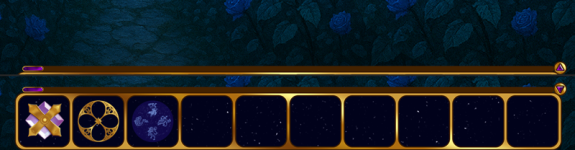
I managed to make it work with duct tape and lots of swearing, but it boiled my brain quite a lot xD
At least it's minimizing-expanding without any troble since no adjustments of contents position needed (:
Today I'm gonna rest, and tomorrow will continue my fight with To-Do list scroll. It feels like I'm reinventing the wheel, but I couldn't find any ready-made solutions :D
See you next week, don't be like me and don't boil your brain (x)
P.S.: there is an AI placeholder on the background of inventory screenshot. I use them so I can see what I'm doing while actual backgrounds aren't ready and I'm creating game mechanics. No AI art will be present in the actual game.
dreamwalker
devlog
ux/ui
