
PostFX Atmospheric refraction (EEVEE next)
PostFX screen space warp materials;
Version 1.3 and 2.0 for Blender 4.3 (EEVEE next);
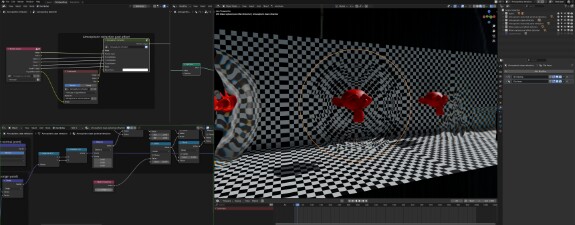

Version 1.3 (25/11/24):
- Water refraction fix;
blend
atmospheric_refraction_postFX_1.3.blend3.04 Mb
Version 2.0 Experimental (27/11/24):
This is not a replacement for the first version, just a rework for Blend Mode materials. It's an experimental branch, and it's a bit problematic, but overall works ok, it doesn't require raytracing in order to work and be able to project transparent objects with dithered material in the background.
blend
atmospheric_refraction_postFX_2.0.blend2.11 Mb
Version 1.2.2 (23/11/24):
blend
atmospheric_refraction_postFX_1.2.2.blend3.05 Mb
Version 1.1.1 (22/11/24):
blend
atmospheric_refraction_postFX_1.1.1.blend2.97 Mb
This method has it's pros and cons, most importantly, its limited to the viewport/camera view, and a lack of screen data causes black stripes at edges (in a few instances this can be negated by setting "Effect Strength" to a negative values in the shader editor); This is similar to game engines implementation, except it doesn't wrap image on sides;
It's achieved by warping the coordinates of the final render image with shader-generated vectors and applying them in the Blender compositor; The result isn't accurate, refraction is limited to screen space and mostly useful for stylized, not realistic results. You can disable/enable needed effects as they are grouped and named for easy tuning; I made this project originally to warp "air space" around objects, but got carried away and tried to make stylized water refractions (so it's a bit simple);
Effects are tied to framerate (30 fps as default), you have to manually adjust values in the shader editor to suit your needs;
Have questions or found an issue in the project, contact me.
The license of the project is CC-BY-NC 4.0;
You can use this project for your renders (including commercial), you don't have to credit me. Though, please, don't resell this project or bluntly copy this implementation to other commercial projects for further selling. No problem with using it for personal projects/commercial renders, as said.


