
How to add groups to alembic for unreal engine
At the moment you need to add the group attribute by yourself.
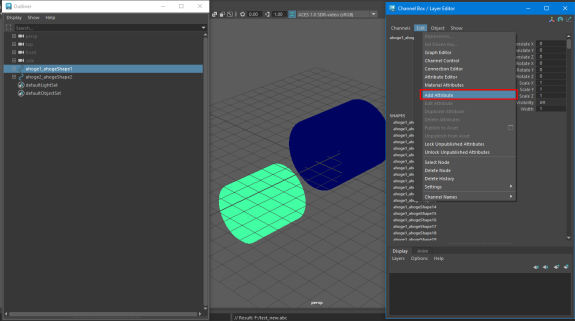
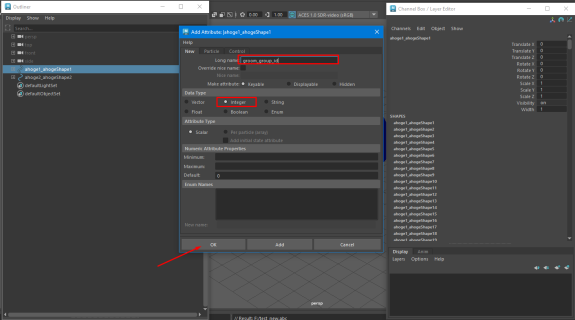
For this you need to open the created ahoge alembic cache in maya. If you have a lot of hair in your hairstyle this can take a long time. Select the desired group and create new attribute "groom_group_id" and assign a group number. You can add the attribute to all groups at once by selecting them and adding the attribute. Then changing the number of each group. Then export to alembic through maya adding an additional attribute "groom_group_id" for export.
Drag the new alembic into the unreal and you will see that you have several groups.
For this you need to open the created ahoge alembic cache in maya. If you have a lot of hair in your hairstyle this can take a long time. Select the desired group and create new attribute "groom_group_id" and assign a group number. You can add the attribute to all groups at once by selecting them and adding the attribute. Then changing the number of each group. Then export to alembic through maya adding an additional attribute "groom_group_id" for export.
Drag the new alembic into the unreal and you will see that you have several groups.


Apple Sup
The Unreal export somehow doesn't work for me, even when following the documentation. It says "Unknown file format: not a valid Alembic". It happens despite me using the Ahoge Unreal export. (Using Maya 2024 and Unreal Engine 5.5)
Jul 03 2025 23:17 (changed)

Ahoge
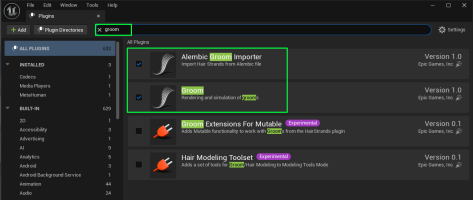
Apple Sup, it's probably because you didn't load Unreal Groom plugins.
Jul 04 2025 13:21
Ahoge
Apple Sup, these two.
Jul 04 2025 15:33

Inu Buta
how i do it with ahoge export ?
Jul 08 2025 12:32
Ahoge
Inu Buta, you need to export ahoge and then import it in Maya
Jul 10 2025 09:03 
1

Jakira Powell
How can I do this with marmoset? My hair comes out too thin when imported into Marmoset
Jul 21 2025 23:22
Ahoge
Jakira Powell, Due to the specifics of the shader in Marmoset, you'll need to increase the hair thickness, this can be done within Marmoset

Jul 21 2025 23:42