
Bulk Uploads are now live on UVR Online!
A batch upload feature has been added to the new version. You can now separate multiple tracks at once — just select up to 5 files in a single batch and let the queue do the rest.
How it works:
- Click the upload button (or drag & drop) and select multiple audio files at once.
- The first file starts processing immediately in the foreground — you'll see the usual progress UI.
- The remaining files are queued automatically. Up to 2 tracks are processed concurrently in the background.
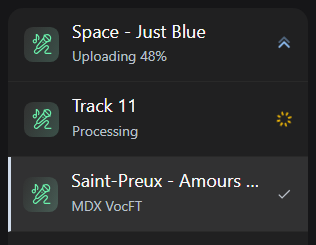
- Every job — including background ones — appears in the Job History widget so you can track each file's status in real time.
- When a processing slot frees up, the next queued file starts automatically.

A few things to know:
- You can add more files to the queue while a batch is already running — you'll get a notification confirming they were accepted.
- Other actions (stem reuse, ensemble) are blocked while a bulk batch is in progress — finish the batch first, or wait for it to complete.
- If you select more than 5 files at once, only the first 5 are accepted.
Increasing the limit to 10 files is being considered for a future update.
Creator has disabled comments for this post.