How to use this website?
This is a small tutorial on how to use boosty.to
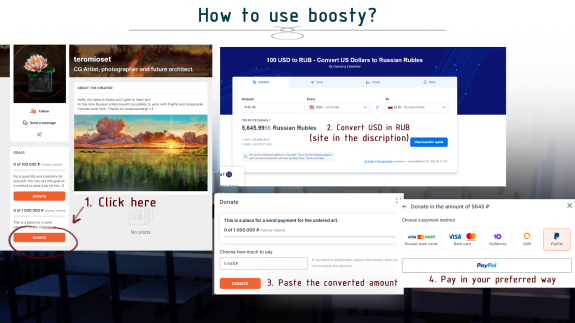
1.Open the page of the desired artist. Click the Donate button
2. Converter the required amount from USD to RUB. The site in the description. With the help of this website: https://www.xe.com/currencyconverter/convert/?Amount=100&From=USD&To=RUB or just use google
3.Paste the converted amount
4. Pay in your preferred way
Done! You are breathtaking! Also, this way you can leave a tip ;)
4. Pay in your preferred way
Done! You are breathtaking! Also, this way you can leave a tip ;)

Small tips:
1. Try to divide large payments into several payments of 10k RUB. With large amounts, there may be problems with payment.
2. If the boost website shows an error, then try to repeat the payment again after a while. If it didn't help, write to your artist.
3. You don't even have to register, you can log in through your Google account and you can pay via PayPal.
Thanks!
Thanks!

teromioset
Also my subscriber from FA recently found out that the Boosty is incompatible with one or more of by Firefox plugins/add-ons. I don't know which ones because I haven't done the troubleshooting work yet. When trying to select a payment method, the loading circle just sits there swirling and nothing ever happens. By loading up a "safe mode" version of the browser with no plugins running at all, basically the fresh install defaults, Boosty works fine and I can send payments with no issues. So if anybody's having problems with it working on their browser, that's something to look into by disabling plugins.
Jul 17 2022 08:46