I Bought the XP-PEN Deco MW PRO (2gen) Tablet to Test It ( My Honest Impressions)


So, friends. Even though I do most of my work on a IPAD, for more complex projects, I have to use a PC. I've wanted to buy a simple drawing tablet for my PC for a long time, one that would replace those huge tablet monitors with their bunch of cables.
When I first started drawing on a PC, I had the simplest graphics tablet (without a screen); it took me about two weeks to get used to it. It was difficult, but I managed.
And after years of waiting, I finally bought a Wacom Cintiq. When I switched to display tablets, I realized that with a large main monitor, a small device with a quick connection to the PC is enough.
When I first started drawing on a PC, I had the simplest graphics tablet (without a screen); it took me about two weeks to get used to it. It was difficult, but I managed.
And after years of waiting, I finally bought a Wacom Cintiq. When I switched to display tablets, I realized that with a large main monitor, a small device with a quick connection to the PC is enough.
Of course, an iPad is different. It's my digital sketchbook, but I can't completely remove the PC from this setup just yet. Perhaps with the release of Blender for iPad, I'll spend even less time on my PC - who knows?
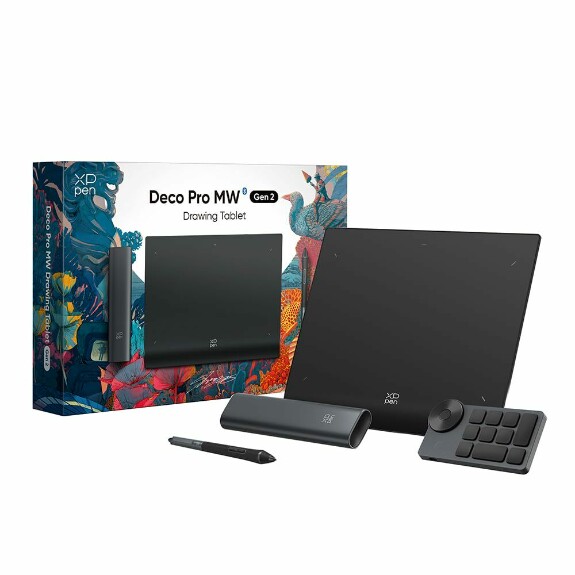
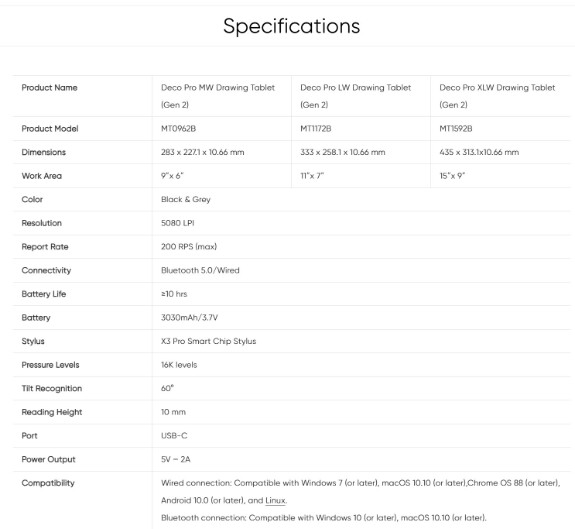
Here are its specs on paper: it boasts 16K pressure sensitivity - sounds cool, but is it really that good in reality?
I've prepared a quick review of this tablet for you! By the way, the advertised compatibility with the iPad doesn't live up to the claims. But it probably works with Android, as the connection process is simpler there.
P.S What tablets do you use besides the iPad? Let us know in the comments.

Итак, друзья. Несмотря на то, что основную работу я делаю на IPAD, в более сложных проектах приходится задействовать ПК.
Я давно хотел купить себе планшет для ПК, который бы заменил эти огромные планшеты-мониторы с кучей кабелей. Когда я только начинал рисовать на ПК, у меня был самый простой графический планшет без экрана (фирмы Genius), я привыкал к нему примерно 2 недели. Это было сложно - но я привык. И спустя годы я ждал, когда куплю себе Wacom Cintiq.
А когда перешел на планшеты-мониторы Cintiq, понял, что с большим основным монитором достаточно небольшого устройства с быстрым подключением к ПК.
Я давно хотел купить себе планшет для ПК, который бы заменил эти огромные планшеты-мониторы с кучей кабелей. Когда я только начинал рисовать на ПК, у меня был самый простой графический планшет без экрана (фирмы Genius), я привыкал к нему примерно 2 недели. Это было сложно - но я привык. И спустя годы я ждал, когда куплю себе Wacom Cintiq.
А когда перешел на планшеты-мониторы Cintiq, понял, что с большим основным монитором достаточно небольшого устройства с быстрым подключением к ПК.
Конечно, iPad - это другое. Это мой цифровой альбом, но ПК из этой схемы пока не выкинуть. Возможно, с выходом Blender для iPad, я еще меньше буду сидеть за ПК - кто знает?
Итак, воспользовавшись распродажей, я взял планшет.
Cпецификации на бумаге:

заявлены 16К степеней нажатия - звучит круто, но так ли хорошо это в реальности?
Я подготовил для вас быстрый обзор этого планшета! Кстати, заявленная работа с iPad не соответствует действительности. Но с Android, скорее всего, работает, там с подключением проще.
Вот мой обзор (на русском языке):
Я подготовил для вас быстрый обзор этого планшета! Кстати, заявленная работа с iPad не соответствует действительности. Но с Android, скорее всего, работает, там с подключением проще.
Вот мой обзор (на русском языке):
P.S А Вы какими планшетами пользуетесь, помимо IPAD ? Напишите в комментариях.

Vladan Žervanov
I use two display tablets, Wacom Cintiq 16 and XP-Pen Artist Pro, but i'm thinking to switch back to my old-but-gold non-display Intuous Pro S. And, since I don't have iPad, I use Galaxy Tab S8 Ultra. Speaking of android, do you know of any good link for Blender for android that is not in Chinese? I know that you are on iPad, but maybe you know for good link :)
Nov 28 2025 14:36 

1

RaZuM
Vladan Žervanov, Yeah, I'm tired of monitors too. They take up a lot of space. For Blender It's better to wait for the developer's version for Android. I heard there was a version on Github, but I'm not sure. There were issues with the interface and power consumption. The release will most likely be for Android as well, not just iPad.
Nov 28 2025 15:25

Vladan ŽervanovReplying to RaZuM
RaZuM, Thank you for allways answering :)
Nov 28 2025 15:35 
1

Мотылек
в меню пк номада выключи использование Win tab и будет нажим
Dec 19 2025 17:32
RaZuM
Мотылек, Спасибо! Я кстати искал данную опцию до обзора, видимо пропустил - так как она выделена серым.
Dec 19 2025 20:52