
MY IPAD PRO DESK SETUP (NOMAD SCULPT/PROCREATE)
Hello, I get quite a lot of messages from you about my iPad setup. Well then. I want to share with you my experience of using it, tell you how convenient it is in my work. This is not an advertisement, maybe you will find something else better, I will be glad to know your setups in the comments and private messages.
TABLET:
The main gadget that combines everything! From drawing to 3D modeling. Of course, in professional work, you still cannot work without a PC! But we are very close to the moment when the computer will not be needed. I tested a lot of tablets and I can say that so far Ipad is the best for my work.
The main gadget that combines everything! From drawing to 3D modeling. Of course, in professional work, you still cannot work without a PC! But we are very close to the moment when the computer will not be needed. I tested a lot of tablets and I can say that so far Ipad is the best for my work.
I use an iPad with 1TB of memory, as I do a lot of video editing, and projects for Nomad weigh quite a lot. I thought about updating, but for now I'm waiting for a new model with a large screen! According to rumors, the iPad Pro Ultra model will be released soon, at 14-16 inches! I hope this is true and we will soon be able to see and try the new product.

MY TABLET: Apple iPad Pro 12.9 (2021) 1TB
EYES PROTECTION
Since I spend a lot of time at the computer and tablet, the first thing I tried to do was find something to relieve eye fatigue. I chose and read reviews for a long time and I liked the glasses. I won’t go into the details of the technology, I’ll say that glasses reduce eye strain, of course, don’t forget to do eye exercises and take a break from gadgets, including your phone! This is very important for maintaining your vision.
EYES PROTECTION
Since I spend a lot of time at the computer and tablet, the first thing I tried to do was find something to relieve eye fatigue. I chose and read reviews for a long time and I liked the glasses. I won’t go into the details of the technology, I’ll say that glasses reduce eye strain, of course, don’t forget to do eye exercises and take a break from gadgets, including your phone! This is very important for maintaining your vision.
MY Googgles: Xiaomi MiJia Blu-ray Goggles Pro ( 25$)

KEYBOARD FOR TABLET
Keyboard! Lots of controversy about this. Do you need a keyboard for a tablet or not? To be honest, for Procreate, I would not buy a keyboard, but for Nomad, it's a different matter. I won’t say that the keyboard is strictly necessary, but in my work it helps to speed up the process of switching lighting modes, canceling masks, choosing a selection, etc. For example, I often switch to Matcap for sculpting, without a keyboard - you have to navigate through the menu, with frequent switching it is not convenient. With the keyboard, you switch the mode with one button! The same thing with masks, you need to constantly climb into the menu to clear it.

According to the model, I proceeded from the fact that I needed several keys, I found a folding keyboard, thinking that it works in the assembled state, but unfortunately only in the disassembled state and this is its big minus. The advantage is its small size, but there are even smaller keyboards with programmable keys, maybe in the future I will change this keyboard to an even more compact one.

My keyboard: WiWU FMK-01 (27$)
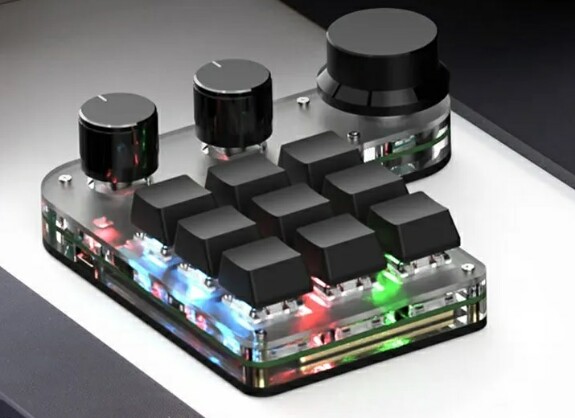
What are the analogues? I found an interesting DIY keyboard, maybe it can work with Ipad. If yes, then this is what you need. Few buttons, small size for portability!
Next stop is TABLE!
Yes, that's right, when you work at a computer, your back suffers no less than your eyes. So I was looking for options for bedside mobile tables. And I managed to find the perfect table! With adjustable legs. Now you can easily lie down on the sofa and not keep the tablet on your knees and your hands on weight! It is very comfortable!
In my case, I bought a hand metal stand that is attached to the table! And now I can not only record the process from Ipad, but also attach my second tablet and upload references to it! It's super convenient!
In my case, I bought a hand metal stand that is attached to the table! And now I can not only record the process from Ipad, but also attach my second tablet and upload references to it! It's super convenient!

Table model: YAROZKA (600*400) = 42$
Metal stand:

Model: WiWU ZM310 (22$)
The glove was a gift
The glove was a gift

I hope you were interested! More news coming soon!
Full list:
TABLET: Apple iPad Pro 12.9 (2021) 1TB (1750$)
TABLET: Apple iPad Pro 12.9 (2021) 1TB (1750$)
EYES PROTECTION: Xiaomi MiJia Blu-ray Goggles Pro ( 25$)
KEYBOARD: WiWU FMK-01 (27$)
PORTABLE TABLE: YAROZKA (600*400) = (42$)
METAL STAND: WiWU ZM310 (22$)

1. Мог бы рассказать немного про эргономику работая за iPad? Если за столом (рабочим местом с монитором) сидишь как расположен iPad - лежит горизонтально на столе или стоит пол углом? Если за указанным в посте портативным, то девайс на стенде или на столе под углом? В общем есть какой-то лайфхак при работе?
2. Что можешь сказать про такой девайс как Sketchboard Pro для iPad?
3. Если что-то ещё используешь буду рад узнать.
Спасибо.
Очки у меня были от Xiaomi, но я их отдал так как начало зрение из-за них падать (очки не ношу в быту).
Большое спасибо.