

Merfin
UI Profiles & WeakAuras
3 982subscribers
51posts
$352.51 of $126 raised
Planning on making Class Panels for Retail in my WotLK stylistics :)
About
Welcome to my Boosty!
Here you’ll find my custom WeakAuras and addon profiles for World of Warcraft — including versions like Cataclysm, Classic, Mists of Pandaria, Retail, and 3.3.5 (WoTLK).
All content is available to my subscribers. Each subscription tier gives access to different packs, plus hidden Discord channels where you can download everything, get updates, and ask for help with setup.
Thanks for your support - it helps me keep creating and improving everything for the WoW community!

WeakAuras - Forever

The first version of Class Auras for all 9 classes is now live and ready to import alongside with MerfinInstaller v7.84
- Recreates the old TBC/MoP Class Panels as closely as possible.
- Supports Power Bars, Combo Points, Swing Bars, and Cast Bars.
- No more waiting for Blizzard to fix their CDM.
- Fully compatible with MerfinUI profiles. The Installer automatically disables overlapping elements, so nothing conflicts with your Class Auras.
- All talents and racial traits are covered
You can find a more detailed explanation of the update in MerfinUI discord
More releases are coming over the next couple of days 🔥


#worldofwarcraft
#forever
#wowf
#wow
#mmorpg
#games
#weakauras
#wa
Creator has disabled comments for this post.
WoW Forever UI

The first UI version for Forever is finally here! This is an early release, so expect lots of changes, fixes and improvements as we keep testing and polishing everything.
What's included
- Full MerfinUI Installer setup
- EllesmereUI as the main UI foundation
- Core addon profiles and settings
- Updated layouts and positioning
- Support for our main resolutions
- Cooldown Manager Custom setup for unsupported classes
- General UI styling, fonts, textures and other MerfinUI stuff
WeakAuras will come later, mainly covering Leveling and Dungeons 🔥


#wow
#wowf
#worldofwarcraft
#forever
#elvui
#ellesmere
#ui
#games
#mmorpg
Creator has disabled comments for this post.
FREE T6 Raid Assignments in Just 1 Minute

I'm glad to introduce a minimalistic and easy to use T6 Spreadsheet built around just a few essential functions:
- Build your roster manually or import it using a JSON string
- Run Auto Assigns, then adjust anything manually if needed
- Save your template and create another one for a different setup
You only need one tab: Assignments. Everything else can be hidden. You can switch to Russian Localization now 🤪
No weird buttons inside cells, no jumping between multiple pages, no additional Viewer Sheets, no unnecessary clutter. The entire UI/UX is designed around making the process as simple and user-friendly as possible. All important tools are now available through the top menu, so everything you need is always easy to access.
The spreadsheet is completely public, you can copy it, modify it, and share it freely. This is also a starting point for trying the [Guild Manager] ecosystem, which expands this workflow with many more tools and features.
🔗Get it [here]
🔗Get it [here]

#worldofwarcraft
#wow
#games
#mmorpg
#raid
#tbc
#theburningcrusade
Creator has disabled comments for this post.
MerfinUI v7.79 — Updates

ElvUI
- ElvUI Unit Frames received a proper rework. They're now slimmer, with text and other elements repositioned to fit the new sizes.
- Target Unit Frame now displays all friendly buffs, up to 24 buffs in 3 rows. Buffs now use a fixed %duration text size.
- TargetTarget Unit Frame now displays only the unit name.
- Pet Unit Frame has been moved below the Player Frame.
- DPS Raid Frames are now more compact.
- Chat Window is now smaller and more compact to fit the new Raid Frames size.
Plater
- Fixed the Target Texture.
- Disabled the new Friendly Nameplate options.
Details
- Unlike before, Details windows are now positioned horizontally next to each other.
- Tiny Threat plugin, which displays threat on your current target, is now enabled by default through the installer.
- The second window now automatically shows Tiny Threat in combat and switches back to Healing Done when combat ends.
- You can now open Segments on both windows, instead of only on the Damage Done window.
Cell
- Cell now properly applies layouts depending on your specialization. For example, if you set a Healer layout for your current spec and DPS for Secondary Talents, the layouts will automatically switch when you respec.
- DPS Raid Frames are now squeezed down to match the compact layout used for ElvUI Raid Frames.
- Cell Party Frames now display party debuffs. No idea why they didn't before, me dumbo.
- Added Healing Way to Shaman Indicators.
- Removed Smooth Progress.
MerfinPlus + Raid Pack + Guild Manager
- MerfinPlus now has a more user-friendly and intuitive interface.
- MerfinPlus settings are now integrated directly with Raid Pack options.
- MerfinPlus is now integrated with Merfin Guild Manager Website Assignments.
Reminders
- The two duplicate Icon groups have been merged into one. Icons now use a specific ButtonTemplate handled by MerfinPlus.
- This prevents the auras from bugging in combat and saves a lot of space. Previously, we had two duplicates of the same groups: one loaded only in combat and another only out of combat.
- Added a Cross Mark in the top-right corner. You can now dismiss individual reminders until the next reload - probably the most requested feature since the start of TBC.
- I went through every single icon to make sure everything works correctly now.
- Fixed an issue where Mage Table sometimes didn't display its name in the Text Reminder because the item wasn't cached yet.
Consumables Panel
- Moved next to the Player Frame, on its left side.
- Every icon now has a blue border effect on mouseover. Previously, only a few icons had it.
- Fixed Lua errors caused by the clickable effect.
- %stacks text is moved to the right bottom corner
For a proper update:
1. Download the new AddOns pack and completely remove your previous one.
2. Download MerfinUI v7.79.
3. Make sure all your addons are up to date via CurseForge.
4. Run the MerfinUI Installer and go through all the steps again from scratch


#mmorpg
#games
#worldofwarcraft
#wow
#elvui
#weakauras
Creator has disabled comments for this post.
Guild Manager Beta Release v1.0
Hi Guys!
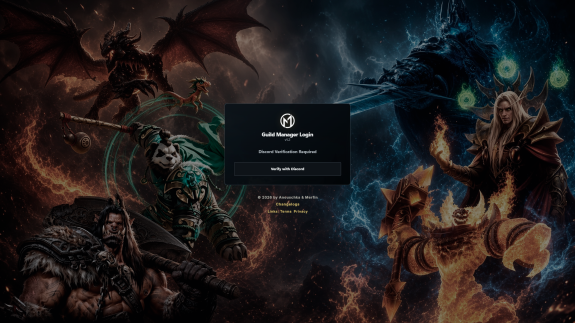
Merfin and Anouschka are excited to finally introduce the new Guild Manager Beta today, just in time for the PTR, and release it exclusively for all 💎Diamond Subscribers.
Here's a quick breakdown of what you can expect:
- Exclusive MerfinUI GM Discord Bot: A dedicated Discord bot that can create Raid Events for you, build Raid Comps, and looks pretty damn good while doing it! It connects directly to your personal Guild Manager, which is also where the bot is configured and managed.
- Full control over your Raid Assignments: Create your own Bossplans with multiple Auto Assign logics, or use preconfigured default plans that are ready to go. Individual Assignments can easily be added, and the entire System is designed to be simple and intuitive. Once everything is set up, click a Button, export your string directly into the MerfinPlus Addon, and let the 🪄 Magic happen: custom Raid Leader and Assignment Widget dropdowns, fully draggable, clickable, and individually configurable.
- Guild Viewer Links: Once your Assignments are ready, you can create a Guild Viewer Link with a single click and share it with your Guild, giving everyone quick and easy access to their Assignments.
- Loot Distribution: Export your Loot String from MerfinPlus after enabling loot tracking and manage your Players directly through the Guild Manager, so you never lose track of your Guild's Gear progression. You can also create your own loot rules using a configurable Loot Score system.
- Attendance Records, Warcraft Logs Average Performance, and Item Priority: Attendance tracking, Average WCL performance, and individual Item Priorities help make loot distribution fair and straightforward. Everything is connected and can be managed with just a few clicks.
- MerfinPlus Addon Integration: After importing your Assignment String, you can send all Assignments directly to your Players with a single click. But thats not all: MerfinPlus is fully interactive. You are not simply importing Assignments, but complete boss plans. Once created and exported through the Guild Manager, MerfinPlus can display those plans directly ingame. And the best part: boss plans can be accessed directly through the Assignment Widgets. Group Leaders and Assistants can also edit and adjust boss plans directly ingame through the addon and then send individual plans straight to the raid. It offers a lot of functionality while still remaining small and compact, showing only the information you actually need during a boss fight.
Officer Management: Your officers can help you manage the Guild Manager by adding them as editors and assigning them the appropriate permissions.
Step by Step Video Tutorials: Complete Video tutorials can be found directly inside the Guild Manager under "User Guide." Please note that the videos are currently available in English only.
Multi Language Support: And on top of everything else, the Guild Manager, Guild Viewer Links, and the BiS Wishlist Submit Page are available in multiple languages, covering almost all commonly used languages!
We are currently still in Beta and actively developing the Guild Manager, so we're looking forward to feedback of any kind. Feature suggestions are also very welcome, as long as they are reasonable and fit within the scope of the project.
The T6 Raidpack is also connected to the Guild Manager Site, for easy and automatically Assignments 🔥
Have fun, and enjoy the PTR weekend! ❤️ 🌻
#worldofwarcraft
#wow
#games
#mmorpg
Creator has disabled comments for this post.
T6 (Black Temple, Hyjal) PTR
This version of the Raid Pack is released for the upcoming PTR and covers mechanics for all 14 bosses, including trash mobs in both raids.
* Enemy Auto Marker with a pre-configured setup for all trash packs
* Friendly Auto Marker with a pre-configured setup for all important debuffs
* Raid Frame Glower
* Boss & Trash Cooldowns
* Interrupt Assigner
* Gurtogg Assigner
* Shahraz GPS
* Proper Wave Counter in MH
* All important debuffs and casts are covered by different types of auras: icons, bars, texts, and more
* Configuration has been moved to MerfinPlus. Your changes are now stored in MerfinPlus SavedVariables, so updating or importing the Raid Pack will no longer accidentally overwrite them
Don't forget to update [MerfinPlus] & [Raid Anchors]
#worldofwarcraft
#wow
#mmorpg
#games
#tbc
#blacktemple
#hyjalsummit
#weakauras
#wa
#theburningcrusade
Creator has disabled comments for this post.
[MerfinSheets] T5 v1.3
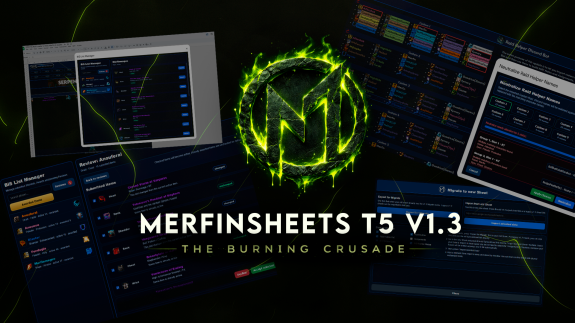
One of the biggest updates quality wise by far 🔥
BiS Wishlist
A new piece of art implemented by @Anouschka. Basically, this is a new tool that allows your raiders to submit their wishlist and select which items they have already acquired. This data synchronizes with the Raid Leader sheet, so when you build the roster, you can already see what gear people need from each boss. It makes building splits so easy.
There is also a full interactive guide on how to use it as a Raid Leader and as a regular raider!
There is also a full interactive guide on how to use it as a Raid Leader and as a regular raider!
Nickname Neutralizer
The only problem with using RaidHelperBot was that it was kinda hard to build assignments when people used weird nicknames on Discord that were far away from their actual character names, rofl. With this new feature, you can neutralize their nicknames. How does it work?
- The spreadsheet takes that nickname and tries to find the player in the Roster tab.
- Then it automatically assigns the proper character that matches their class in the RaidHelperBot comp.
- If they have more than one character of the same class, it asks you to select the one they play on.
A total killer feature ⚔️
Export/Import Migration
The old Export / Import doesn't exist anymore. Instead, there is now a dialogue window that can be opened from the Menu Bar. It allows you to migrate from one version to another by just pasting the spreadsheet link and clicking one button. So smooth and efficient. No separate export for each tab. It also solves the issue of not being able to copy the code outside of the spreadsheet.
Assignments
- "Active Preset" is no longer in the header, but below it.
- Saved assignment fields are now in this section, next to the "Save" and "Load" buttons.
- The header is now frozen with your current Raid Setup, making it easier to set up assignments.
P.S. We're already working on v1.4 with even more life changing features coming soon 💖
#wow
#worldofwarcraft
#games
#mmorpg
#tbc
#theburningcrusade
#t5
#auras
#weakauras
#wa
Creator has disabled comments for this post.
T5 Google Spreadsheet v1.0
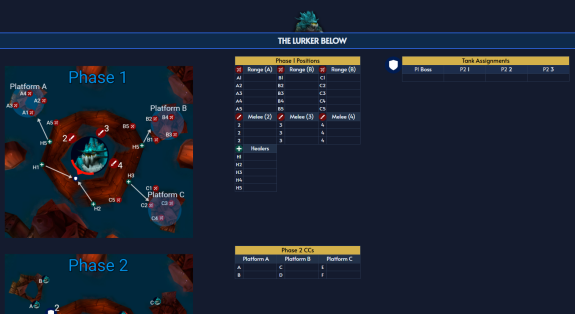
A long-awaited spreadsheet is finally out in its first version! Burning Crusade T5 Raid Leader spreadsheet is made for guild leadership to simplify assigning people to positions during fights, cooldown rotations, and more. The interface solves a few common problems you may have had with other sheets or while trying to make your own:
- It supports both manual roster typing and RaidHelper Discord bot string imports
- You don't have to manually recolor every name to match its class. The spreadsheet does it automatically with smart conditional formatting
- You don't have to rewrite names for every assignment manually. The spreadsheet provides convenient dropdown menus where you can select characters instantly
- It's very easy to switch between raids. The spreadsheet allows you to save setups and restore them later. Very useful if you need to pre-assign multiple splits
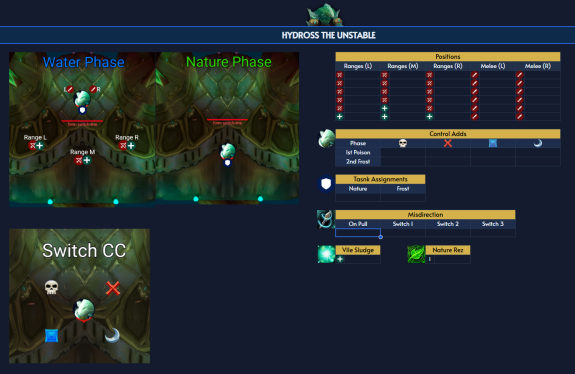
T5 Viewer is the frontend version of the Raid Leader spreadsheet. It's meant to be shared with your raiders so they can view assignments, screenshots, and raw information without access to the raid leader tools from the main sheet. All 10 bosses from Tempest Keep and Serpentshrine Cavern have been added. Every important mechanic has been mapped out with aesthetic and easy to read tables. Huge shoutout to @Jaypie for working on the tactics and images.
P.S. Spreadsheets have always been Diamond Tier content
What to expect in future updates?
- I'll bring back the Magic Assignment Tool from the MoP version. That tool automatically assigned people to tables using boss-specific logic for each assignment. It takes time to code all the logic, but it'll definitely return eventually
#wow
#worldofwarcraft
#tbc
#t5
#raid
#mmorpg
#games
Creator has disabled comments for this post.
TBC - T5 (TK, SSC) - PTR version

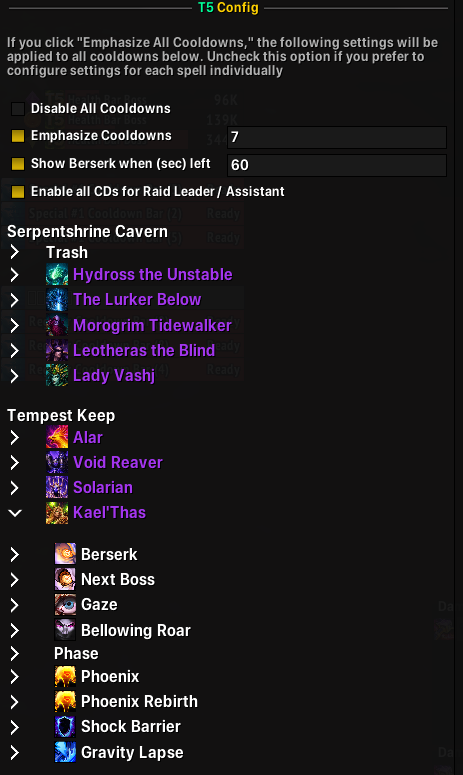
A PTR version of the T5 raid tier WA is publicly available on my Discord for everyone. I’ll be polishing bugs and listening to feedback to make sure it’s in perfect shape before the phase 2 release.
The raid pack is built around the same structure I used for my T15 pack, with some new and more efficient ways of displaying certain elements.
The spreadsheet for subscribers will be released on May 14.

#wow
#worldofwarcraft
#wa
#weakauras
#raid
#tbc
#mmorpg
#games
Creator has disabled comments for this post.
Subscription levels3
Silver Boosty
$3.8 per month

Includes access to:
- UI and WeakAuras for WotLK 3.3.5 Private Server.
- UI and WeakAuras for Cataclysm Whitemane Private Server.
- Discord access.
+ chat
Gold Boosty
$7$5.6 per month
-20%
billed every 12 months

- MerfinUI Installer, allowing you to set up the full UI in just a few clicks.
- A large collection of WeakAuras designed to perfectly match the UI, including Class Auras, Raid Auras, and various QoL Auras.
- Prioritized Support Channel, where the team can help you with setup and troubleshooting.
This subscription includes the UI Installer and WeakAuras for all supported expansions as:
- Live (TBC Anniversary, MoP Classic, Classic, Midnight, Retail)
- Private Servers (WotLK 3.3.5, Cata, MoP Private)
+ chat
Diamond
$15.2$12.1 per month
-20%
billed every 12 months

Includes access to:
- All Gold tier benefits.
- Interactive Assignment Spreadsheets for:
- T15 Mists of Pandaria: Throne of Thunder
- T5 TBC Anniversary: SSC and TK
- Priority access to the Discord VIP channel.
- Personal WeakAura Request
- Available only for MoP Classic, TBC Classic, Wrath 3.3.5, and Cataclysm Classic.
- If the request is too large or time consuming, I reserve the right to decline it.
+ chat