HOW TO DONATE
⭐ To send me donation you will need to see my profile info on the left side of my page (for PC and tablets) or on the front section my page (for mobile devices) and find the button "Send tip".
It is required to be authorized to send me donation.

⭐⭐ After clicking the button "Send tip" new window with tip information will be opened, where you will need to specify donation amount. After you decide on donation amount click the button "SEND".
Note: donation amount is indicated in RUB by default, you will need to change it to USD.

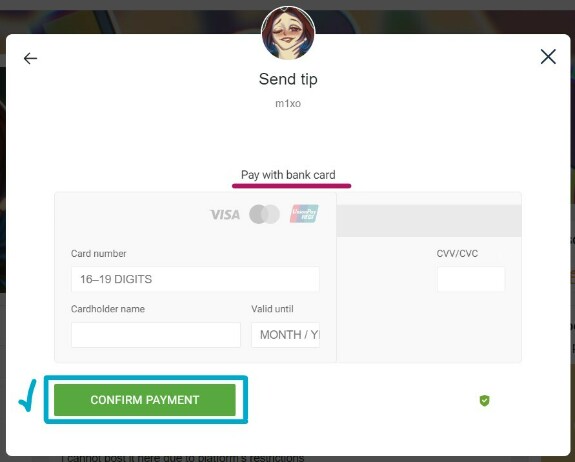
⭐⭐⭐ As a final step after clicking the button "SEND", new window will be opened, where it is required to enter your bank card details (Boosty supports Visa, Mastercard and UnionPay). After finishing click the button "CONFIRM PAYMENT".
Note: Unfortunately, Boosty temporarily does not support PayPal system (since spring 2024). If you are not sure whether to use your bank card for sending me donations, then better don't do it for your personal inner peace ପ(๑•ᴗ•๑)ଓ ♡ However, I would like to point out that it is common practice to use bank cards online in my country ٩(ˊᗜˋ*)و