
Tutorial (SimPe) "+Separates4AllMod"
RUS
Вы можете самостоятельно изменить категорию вещей для вашей игры. Для этого понадобится программа SimPe скачать тут: downloads SimPe
Вы можете самостоятельно изменить категорию вещей для вашей игры. Для этого понадобится программа SimPe скачать тут: downloads SimPe
Выбираете нужную папку, нужные перекраски и устанавливаете категорию. Внимание: выбирать сетку/меш не надо. Возникнут вопросы или проблемы - свяжитесь со мной. <3
P.S: для работы вам нужен мод +Separates4AllMod мод работает только для игр без диска/оригинала EA
ENG
You can independently change the category of things for your game. To do this, you need the SimPe program download here: downloads SimPe
P.S: для работы вам нужен мод +Separates4AllMod мод работает только для игр без диска/оригинала EA
ENG
You can independently change the category of things for your game. To do this, you need the SimPe program download here: downloads SimPe
Select the desired folder, the desired repaints and set the category. Attention: you do not need to select a grid/mesh. If you have any questions or problems, please contact me. <3
P.S: you need a mod to work +Separates4AllMod mod only works for games without disc/original EA
P.S: you need a mod to work +Separates4AllMod mod only works for games without disc/original EA
1) откройте программу, найдите "сервис" - "Сканирование папки"
1) open the program, find "service" - "Scan folder"

-----------------------------------------------------------------------------------
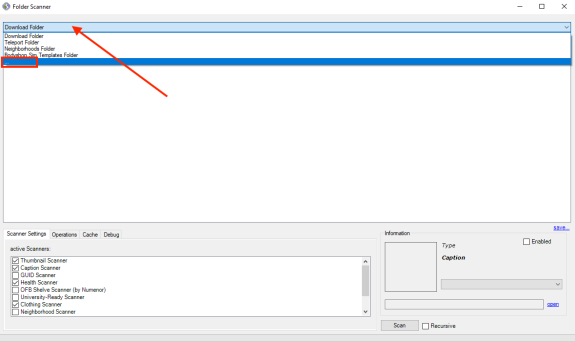
2) откроется мини-окно. выберите в выпадающем списке "..."
2) a mini window will open. select "..." from the drop-down list
2) a mini window will open. select "..." from the drop-down list
-----------------------------------------------------------------------------------
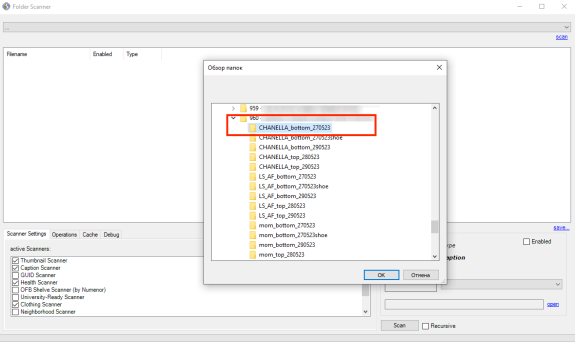
3) выберите пусть к вашей папке с одеждой
3) choose let to your clothes folder
-----------------------------------------------------------------------------------
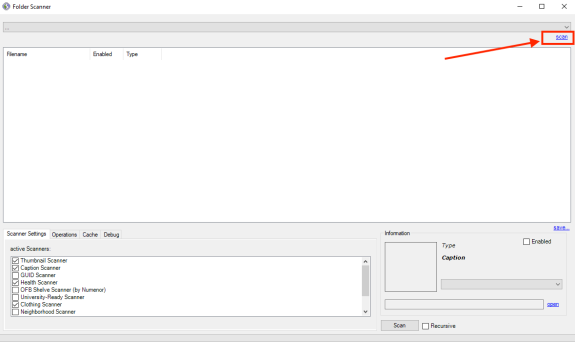
4) нажмите "scan"
4) click "scan"
-----------------------------------------------------------------------------------
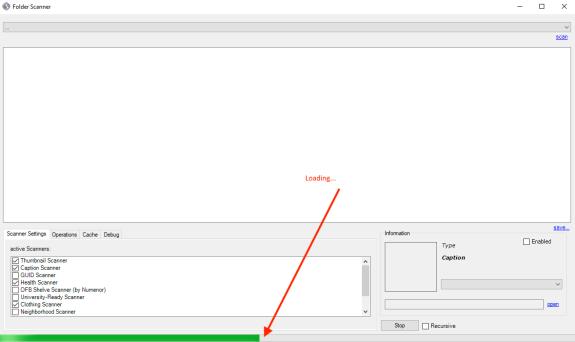
5) подождите зеленую полосу загрузки внизу
5) wait for the green loading bar at the bottom
-----------------------------------------------------------------------------------
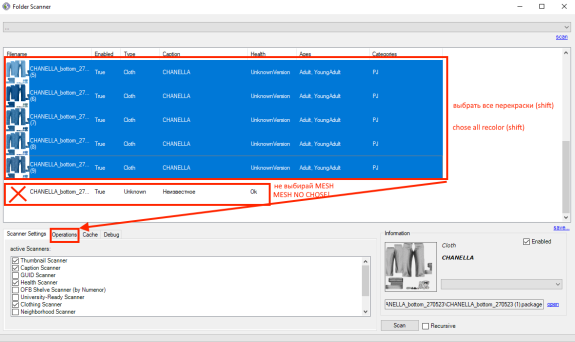
6) выберите все перекраски одежды которые вы хотите изменить, можно выбрать несколько зажав кнопку "shift"
6) select all the recolors of clothes that you want to change, you can select several by holding the "shift" button

-----------------------------------------------------------------------------------
7) внимание: не выбирайте файл с сеткой. только перекраски.
7) note: don't select mesh file. only recolor clothes.
-----------------------------------------------------------------------------------
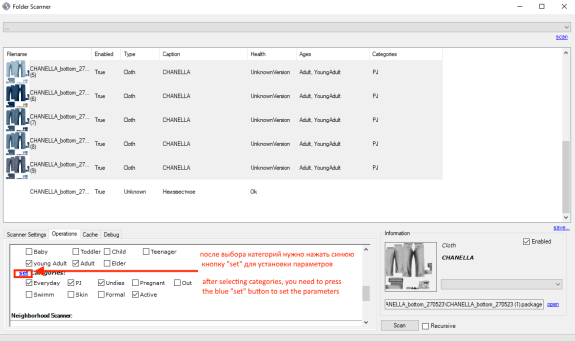
8) выберите нужные категории одежды которые вы хотите установить. внимание: осторожно, если вы уберете все галочки и оставите перекраски без установок категорий - вы можете получить глюк в игре. всегда проверяйте галочку перед выходом из программы.
8) select the desired categories of clothes that you want to install. Attention: be careful, if you uncheck all the boxes and leave repaints without category settings - you can get a glitch in the game. always check the checkbox before exiting the program.

-----------------------------------------------------------------------------------
9) когда вы выбрали все нужные категории вам необходимо сохранить изменения - для этого нажмите синюю кнопку "set" после этого изменения вступят в силу.
9) when you have selected all the necessary categories, you need to save the changes - to do this, click the blue "set" button after this change will take effect.
-----------------------------------------------------------------------------------
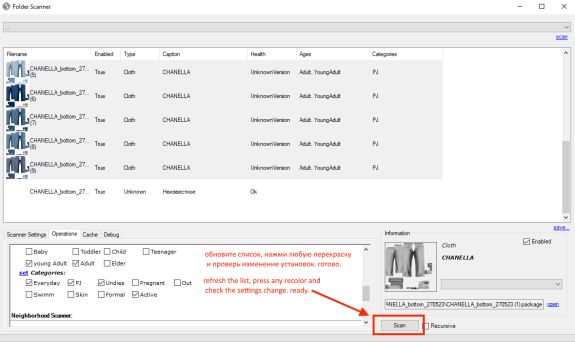
10) нажмите кнопку "сканировать" что бы проверить изменения, выберите перекраску одежды и убедитесь что ваша одежда имеет категории которые вы назначили ранее. если категории не приняли ваших изменений (вы забыли нажать синюю кнопу) вам необходимо начать с пункта "6".
10) press the "scan" button to check the changes, choose to recolor clothes and make sure your clothes have the categories you assigned earlier. if the categories did not accept your changes (you forgot to press the blue button) you need to start from point "6".
-----------------------------------------------------------------------------------

~Kiyo~
Thank you so much for this lol I might just start making tops and bottoms available in all categories now🥹🤷🏽♀️
Jun 01 2023 17:12

LindaSim
~Kiyo~, I hope everything works out for you. I tried to make this tutorial clear and detailed. I needed to do it right away, but I didn’t think that subscribers needed it. now everyone can make the desired category. 

Jun 01 2023 19:15 
1

~Kiyo~Replying to LindaSim
LindaSim, Our Sims can now wear the appropriate clothes for for any occasion!🙌 your awesome💖 I appreciate your continuous help aswell as your top tier custom content creation!😉👍
Jun 02 2023 00:02 

1


