creator cover leXxiR
leXxiR

leXxiR 

Amazfit watchface maker

116subscribers

33posts

About

Making / porting / adapting dials for Amazfit watches: GTR4, Balance, T-Rex2, GTR3.
Most of my dials are quite complex and multifunctional.

Weather Forecast App Update

v1.4.0
+ added a setting for displaying wind force or speed in km/h (for API 4.2 and higher)
* fixed UVI hints for new firmwares
* fixed hints with the moon info
* fixed vibration on new firmwares
>>>

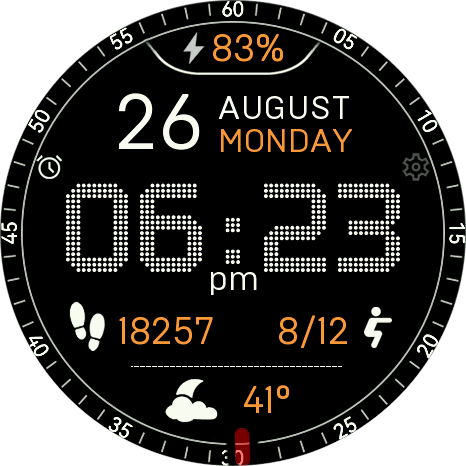
Digital Technology ++


Classic digital dial with lots of settings.
• Double tap on the gear to adjust the colors: the color palette opens, you can move in the palette using the buttons on the screen or by rotating the crown.  
Double tap on activity name to enable edit mode: you can switch activity to the next one. You can also rotate the digital crown to switch activity. 
• Tap on the activity value opens the corresponding activity screen.
• The list of switchable activities can be edited in the dial settings.
• Rotating the crown switches the central activity (by default). The crown action can be set in the dial settings.
• Tap on the date to open the calendar.
• Tap on the alarm clock to set it up.
• Tap on the weather to open the Weather Forecast app.
• Tap on the area under the weather switches the view: temperature - pressure - altitude - sun - moon.
Подскажите, как принудительно установить русский скин, т.к. на балансе 2 нет поддержки русского языка и скин тоже автоматом встает английский.
leXxiR,  clapping_hands
Добавил версию циферблата с одним русским языком.
leXxiR, супер, спасибо

Simple LX watchface update


v1.1
+ added sleep time to the list of activities
+ added moonrise/moonset time to the list of activities
+ added body temperature to the list of activities (not functioning on GTR 4)
(to use them, do not forget to enable them in the watch face settings: menu - view - activities list)
+ when the crown is turned off in the settings of the dial, the system function for the crown is activated for button mode (opening messages and the control center) - for Balance 2
+ activation method has been changed: to enable edit mode to select the activity - double tap to ellipsis symbol (...)
* fixed the found issues
* optimization
>>>

Weather Forecast App Update

v1.3.0
+ added support for new devices: Balance 2, T-Rex 3 Pro, Bip 6
+ updated design
+ the AQI (air quality index) has been removed
+ added information about the moon: moonrise, moonset, current phase
>>>
Спасибо, поставил на bip 6.

Simple LX

Stylish digital watchface. Different color options and the choice of weather data source.
• Support 12/24 hour time formats.
• Russian / English languages.
• Tap on the activity to open the corresponding screen.
• Double tap on the ellipsis symbol (...) under the activity to enable edit mode: you can switch activity to the next one. You can also rotate the digital crown to switch activity. You can select any pair of activities.
• Double tap on the gear to adjust the colors:
 the color palette opens, you can move in the palette using the buttons on the screen or by rotating the crown.  
• Long press on the gear to open the dial setting.
• Triple tap on the gear to lock all tap zones. Long tap on the "lock" to unlock tap zones. 
How to install the watch face
QR (GTR4, Active 2):

Let's Color watchface update

v4.2.2
+ added single color setting for AOD
+ added separate color selection for icons and bezels
+ updated the barometer code
+ ALTITUDE has been added to the list of activities
* fixed: the time and data on the AOD were not updated on the new firmware on Balance / Balance 2 / T-Rex3 / Pro
* code optimization
>>>
Some data fields are not displaying on my t-rex3 99% of the time.
Mark Steele, hi. Try this updated version.
Hi and TY, i mince to download the ZPK file, but now have no idea how to install it on my watch. Will you be updating the Zepp store ?
Mark Steele, the location cannot be changed from the app on the watch, but it can be changed in the Zepp app on the phone.
About the Wind Force. The ZeppOS system has limitations, you can only display the value of force, but you cannot get it as a number in order to perform any operations with it. Therefore, it is not possible to do auto-scrolling.
And thanks for the support.  star

Planetarium


The Planetarium is an unusual dial.
The time and charge of the battery are shown by the progress moving along the orbits.
The perimeter of the screen circle shows the progress of the steps.
Tap in the center - background change (3 pcs.).
Tap zones: steps, date > calendar, weather.
AOD is full, without seconds or background.
Russian / English languages.
GTR4:
zip
Planetarium_0.3_gtr4.zip542.82 Kb
Balance and T-Rex3:
Здравствуйте,понравился ваш циферблат https://4pda.to/forum/index.php?showtopic=1077877&st=140#entry129153253 но необходимо кое что в нем подправить ибо зрение уже не то,возьметесь и сколько это будет стоить?

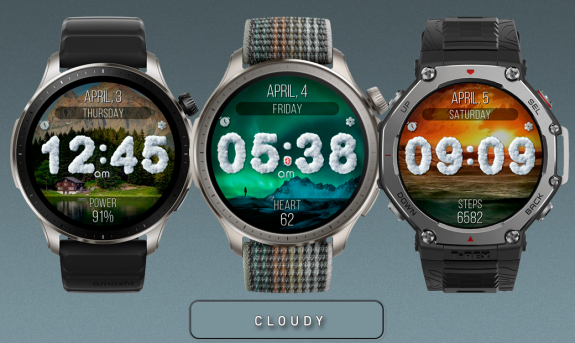
Cloudy

A dial with beautiful backgrounds and a large clock.
When the screen is activated and at the beginning of each minute, the time digits bounce merrily :)
• Support 12/24 hour time formats.
• Russian / English languages.
• Double tap on the gear to change background.
• In the dial settings, you can turn on a random background and set the background change once a day.
• Long press on the gear to open the dial setting.
• Tap on the activity to open the corresponding screen.
• A long tap on the activity enables editing mode: by clicking on the left/right side of the editing frame, you can change the values. You can also rotate the crown.
Omgoshhhhh I love it!!!!! 🥰 ☁️ 
Thank you for creating and setting up for the GS4! 
Subscription levels0
No subscription levels
Go up