
WitcherFGMod for RTX 50xx
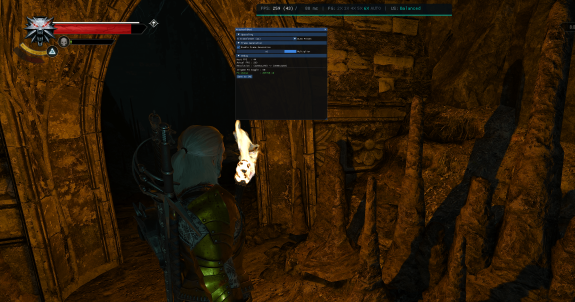
DLSS Super Resolution + Multi Frame Generation (x2–x6) for The Witcher 3 Next-Gen
zip
WitcherFGMod-v1.0.0.zip2.96 Mb
Brings modern DLSS upscaling and NVIDIA Multi Frame Generation to The Witcher 3
(v4.0.x, DX12) on
RTX 50 series
GPUs. The mod loads NVIDIA Streamline 2.11
alongside the game's built-in Streamline 1.5.6 and routes DLSS and Frame
Generation through the modern runtime — the legacy version doesn't support the
Blackwell architecture, so the stock DLSS/FG options are broken or unavailable on
RTX 50 cards.
Features
- DLSS Super Resolution on the current DLSS 310 transformer model — anyquality mode (Quality / Balanced / Performance / Ultra Performance).
- Multi Frame Generation x2–x6 — set the multiplier in WitcherFGMod.ini orlive in the in-game overlay.
- In-game overlay on Page Down — multiplier, DLSS preset, live Host/GeneratedFPS and render → output resolution.
- Follows the game's own toggle — turn Frame Generation on/off in the in-gamegraphics menu and the mod follows it automatically.
- Selectable DLSS preset (J / K / L / M) for tuning image stability.
Requirements
- NVIDIA RTX 50 series GPU (Blackwell) with an MFG-capable driver.
- The Witcher 3: Wild Hunt v4.0.x, running in DX12 mode.
- Up-to-date DLSS 4 / 310-series (310.6) nvngx_dlss.dll and nvngx_dlssg.dllin your game's bin/x64_dx12 folder. Update them with DLSS Swapper if needed.
- NVIDIA Reflex enabled in-game is recommended for the best frame pacing.
Installation (manual — no installer)
- Back up your …/The Witcher 3/bin/x64_dx12/ folder first.
- In that folder, rename the original sl.interposer.dll tosl.interposer_real.dll (the mod forwards to it).
- Extract the archive into …/The Witcher 3/bin/x64_dx12/ — copysl.interposer.dll, WitcherFGMod.dll, WitcherFGMod.ini and thesl2\ folder (replace if asked).
- Copy your game's own nvngx_dlss.dll and nvngx_dlssg.dll (already inbin/x64_dx12) into the sl2\ subfolder.
- In game: set DLSS to any quality mode and enable Frame Generation in thegraphics menu. Set Reflex to On+Boost.
- Press Page Down in-game to open the overlay and pick your multiplier.
Full step-by-step and the expected folder layout are in INSTALL.md inside the
archive. To remove, follow UNINSTALL.md.
Notes
- Higher multipliers (x4–x6) trade latency for smoothness; x4 is the sweet spotfor most setups. Use a frame rate close to your monitor's refresh.
- This mod does not modify game files — it sits beside them and is fullyreversible.
the witcher 3
frame generation
multi frame generation
mfg
rtx 50
dlss