
AutoMonOffinator 1.0.0
Protect your OLED screen from burn‑in with intelligent auto‑dimming
I'm happy to announce the first public release of AutoMonOffinator – a free Windows utility I built to keep my own OLED monitor safe from static UI elements, and now you can use it too.
🔥 What is AutoMonOffinator?
It automatically dims static parts of your screen when you're not interacting with them.
This reduces the risk of permanent burn‑in on OLED panels – without sacrificing usability.
This reduces the risk of permanent burn‑in on OLED panels – without sacrificing usability.
Key features:
- 🖥️ Taskbar Dimmer – dims the Windows taskbar when idle
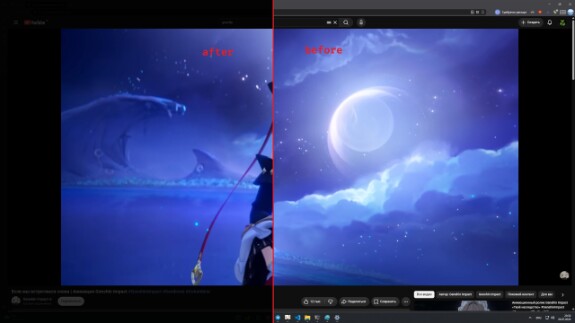
- 🌐 Browser UI Dimmer – darkens the edges of browser windows (Chrome, Edge, Firefox, Opera, Brave, etc.)
- 🎬 Screen Dimmer with Focus Dimming – dims the whole screen, but keeps video areas bright (YouTube, Twitch, etc.)
- 📱 App UI Dimmer – create custom profiles for any app (define layers with margins)
- ⚙️ Configuration Console – adjust every setting, manage power timers, exclude processes, and more
- 🛡️ Watchdog – auto‑restarts any crashed components
- 🌍 Multilingual – adapts to your system language (Russian/English)
- 💾 No installation – just unpack and run
🎯 Why I built it
I own an OLED monitor and got tired of worrying about static UI elements burning in. I wanted a tool that could:
- detect when I'm not using the computer,
- intelligently dim static UI without ruining video playback,
- be fully configurable for different apps and use‑cases.
AutoMonOffinator is the result – and it works exactly the way I wanted.
🔧 How to use it
- Download the latest release from GitHub Releases
- Extract the ZIP archive to any folder
- Run AutoMonOffinator.exe
- Right‑click the tray icon → Settings to configure everything
All settings are stored in AutoMonOffinatorResources/AutoMonOffinator_config.json.
🙏 Thank you
Try it out, share your feedback, report bugs, and suggest improvements – all are welcome!

